.png)


Kubernetes has become the standard platform for running containerized applications in production. Today, many organizations run their microservices, APIs, and internal platforms on Kubernetes clusters.
Kubernetes is not just a container scheduler. It is a distributed system that manages applications across multiple machines. Because of this, understanding Kubernetes architecture is important for engineers who operate or troubleshoot clusters.
In production environments, this knowledge helps with:
I remembered that when I started operating Kubernetes clusters, one thing became clear: commands like kubectl get pods only show the current status. To understand why something is happening, you need to know how components like the API server, scheduler, controllers, and kubelet work together.
In the next sections, we will explore:
Kubernetes architecture describes how a Kubernetes cluster is structured and how its components work together to manage containerized applications. Instead of running containers directly on individual machines, Kubernetes introduces a cluster-based system where multiple components coordinate to deploy, schedule, and maintain workloads.
A Kubernetes cluster is the fundamental unit of deployment in Kubernetes. It consists of a group of machines (called nodes) that work together to run containerized workloads.
These machines can be:
Within the cluster, Kubernetes manages workloads using a centralized control layer and a set of worker nodes.
Kubernetes follows a distributed system model where responsibilities are divided among several components. Each component performs a specific role and continuously communicates with others to maintain the cluster’s state.
Instead of manually managing containers, users define the desired state (in the form of YAML) of the system. For example, we declare that an application should run with three replicas. Kubernetes then ensures that the cluster always matches that desired configuration. If a container fails or a node becomes unavailable, Kubernetes automatically works to restore the intended state.
This continuous reconciliation process is a core design principle of Kubernetes.
A Kubernetes cluster is broadly divided into two major parts:
1. Control Plane
The control plane is responsible for managing the entire cluster. It makes global decisions about the system and maintains the cluster’s overall state.
Some of its key responsibilities are:
2. Worker Nodes
The worker nodes are the machines where actual application workloads run. These nodes host containers inside Pods and provide the resources required to run applications.
Each worker node includes components that interact with the control plane and ensure that the workloads assigned to that node are running correctly.
Worker nodes are responsible for:
In simple terms, the control plane manages the cluster, while worker nodes run the workloads.
Understanding this separation is important because most Kubernetes operations, from scheduling Pods to maintaining application availability, depend on the interaction between these two parts of the system.
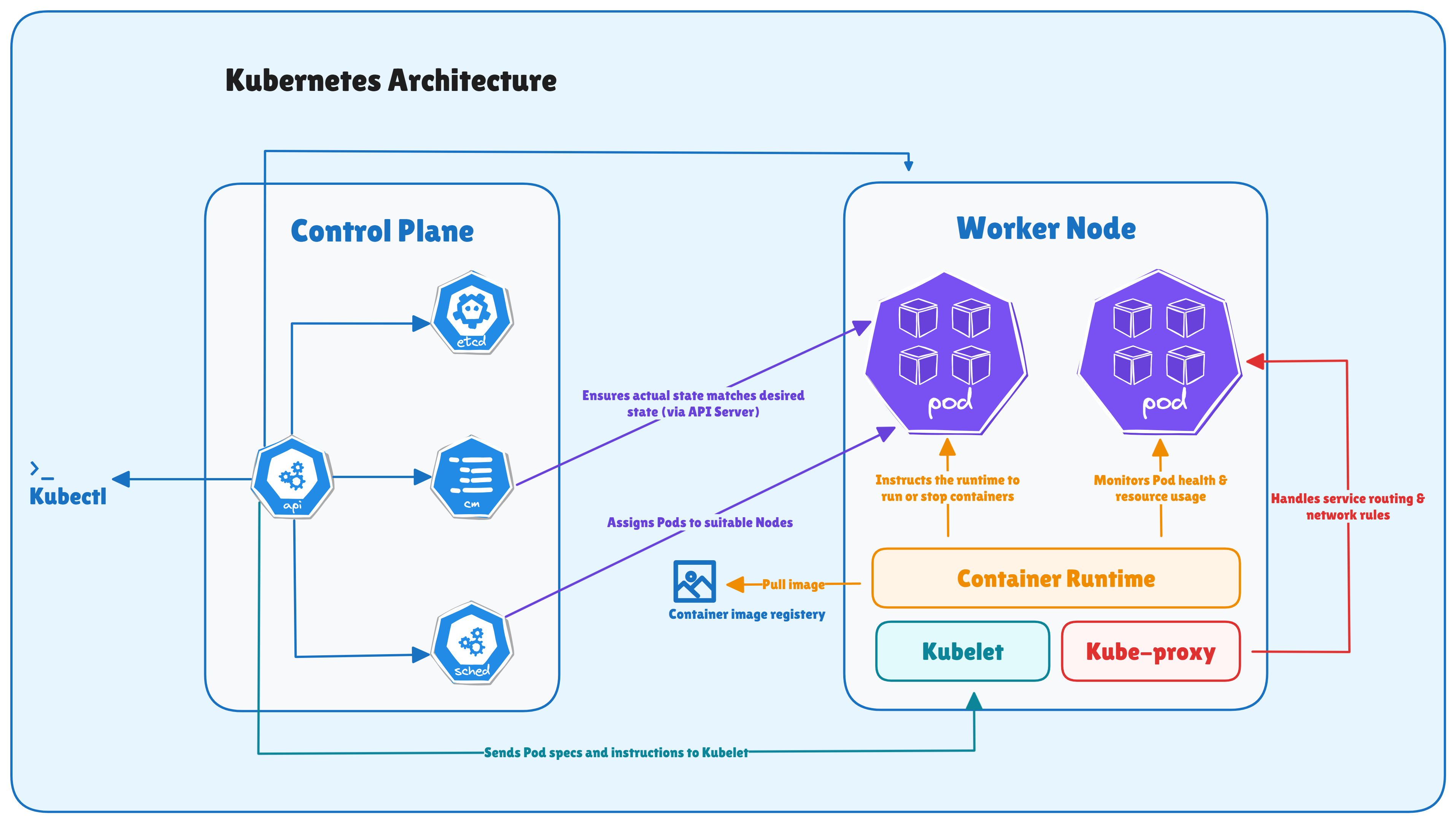
The main components of the Kubernetes control plane are:
Each of these components performs a specific function, and together they maintain the health and behavior of the cluster. Let's discuss them one by one.
The kube-apiserver is the most important component in the Kubernetes control plane. It acts as the central entry point for all operations in the cluster.
Every interaction with Kubernetes goes through the API server. This includes:
In practice, the API server exposes a REST API that allows clients and internal components to interact with the cluster.
For example, when a user runs a command like:
kubectl get podsThe request is sent to the API server, which processes the request and retrieves the information from the cluster state.
The API server is responsible for several important tasks:
etcd is the primary data store for Kubernetes. It is a key-value database that stores all cluster data.
This includes information such as:
In Kubernetes, etcd is the source of truth for the entire cluster state.
Whenever a new object is created or updated, the API server writes the data into etcd. Other components then read this information to understand the current state of the system.
For example, when a user runs:
kubectl get podsThe API server retrieves the requested information from etcd, where the cluster state is stored.
The kube-scheduler is responsible for deciding where Pods should run inside the cluster.
When a Pod is created, it initially exists in the cluster without being assigned to any node. At this stage, the scheduler evaluates available worker nodes and selects the most suitable one.
The scheduling decision is based on several factors, including:
The scheduler goes through a filtering and scoring process to determine the best node for a Pod.
The kube-controller-manager runs a collection of controllers that continuously monitor the cluster and ensure that the system behaves as expected.
The controllers are background processes that watch the cluster state through the API server and take corrective actions when needed.
Some commonly used controllers are:
The key concept behind controllers is the reconciliation loop.
As we know in Kubernetes, we declare the desired state of the system, and the Controllers constantly compare this desired state with the actual state running in the cluster.
If there is any difference, the controller works to restore the intended state.
For example:
This continuous reconciliation process is what allows Kubernetes to provide self-healing behavior.
The cloud-controller-manager integrates Kubernetes with cloud provider APIs. This component is mainly used in environments running on public cloud platforms such as:
The cloud controller allows Kubernetes to interact with the underlying cloud infrastructure.
The typical responsibilities are:
By separating cloud-specific logic into a dedicated component, Kubernetes keeps its core system independent from cloud providers while still supporting deep integration with cloud infrastructure.
The main components of the Kubernetes worker node are:
Together, these components ensure that containers start correctly, remain healthy, and can communicate with other services inside the cluster. Let's discuss them one by one.
The kubelet is the main agent that runs on every worker node in a Kubernetes cluster. Its primary responsibility is to ensure that containers described in Pod specifications are running as expected.
The kubelet continuously communicates with the API server to receive instructions about which Pods should run on that node. Once a Pod is assigned to a node by the scheduler, the kubelet reads the Pod specification and takes the necessary steps to start and manage the containers.
Some of the key responsibilities of the kubelet are:
The container runtime is the component responsible for running containers on the worker node. It handles tasks such as pulling container images, creating containers, and managing their lifecycle.
When the kubelet receives a Pod specification, it instructs the container runtime to start the required containers.
The most common container runtimes used in Kubernetes include:
Kubernetes interacts with container runtimes using a standard interface called the Container Runtime Interface (CRI). The CRI defines how the kubelet communicates with the runtime to perform operations such as:
Earlier versions of Kubernetes supported Docker directly. However, Docker support was removed from Kubernetes starting with version 1.24, when the dockershim component was deprecated. Since then, Kubernetes interacts with container runtimes through CRI-compatible runtimes.
This change simplified the Kubernetes architecture by separating container runtime responsibilities from the orchestration layer.
The kube-proxy component is responsible for handling network communication inside the Kubernetes cluster. It ensures that traffic is correctly routed between kubernetes Services (stable network endpoints used to expose a group of Pods) and the Pods that run the application workloads.
Kubernetes Services provide a stable way for applications to communicate with Pods, even though Pods can be created or destroyed dynamically.
kube-proxy ensures that network traffic is correctly routed to the appropriate Pods behind a Service. Kube-proxy runs on every worker node and manages networking rules that allow traffic to reach the correct destination.
To implement service networking, kube-proxy typically uses one of the following mechanisms:
Both approaches program network rules in the Linux kernel to route traffic to the correct backend Pods.
Some of the responsibilities of kube-proxy are:
As we know, Pods are ephemeral and can be replaced at any time; kube-proxy continuously updates networking rules so that Services always route traffic to the currently available Pods.
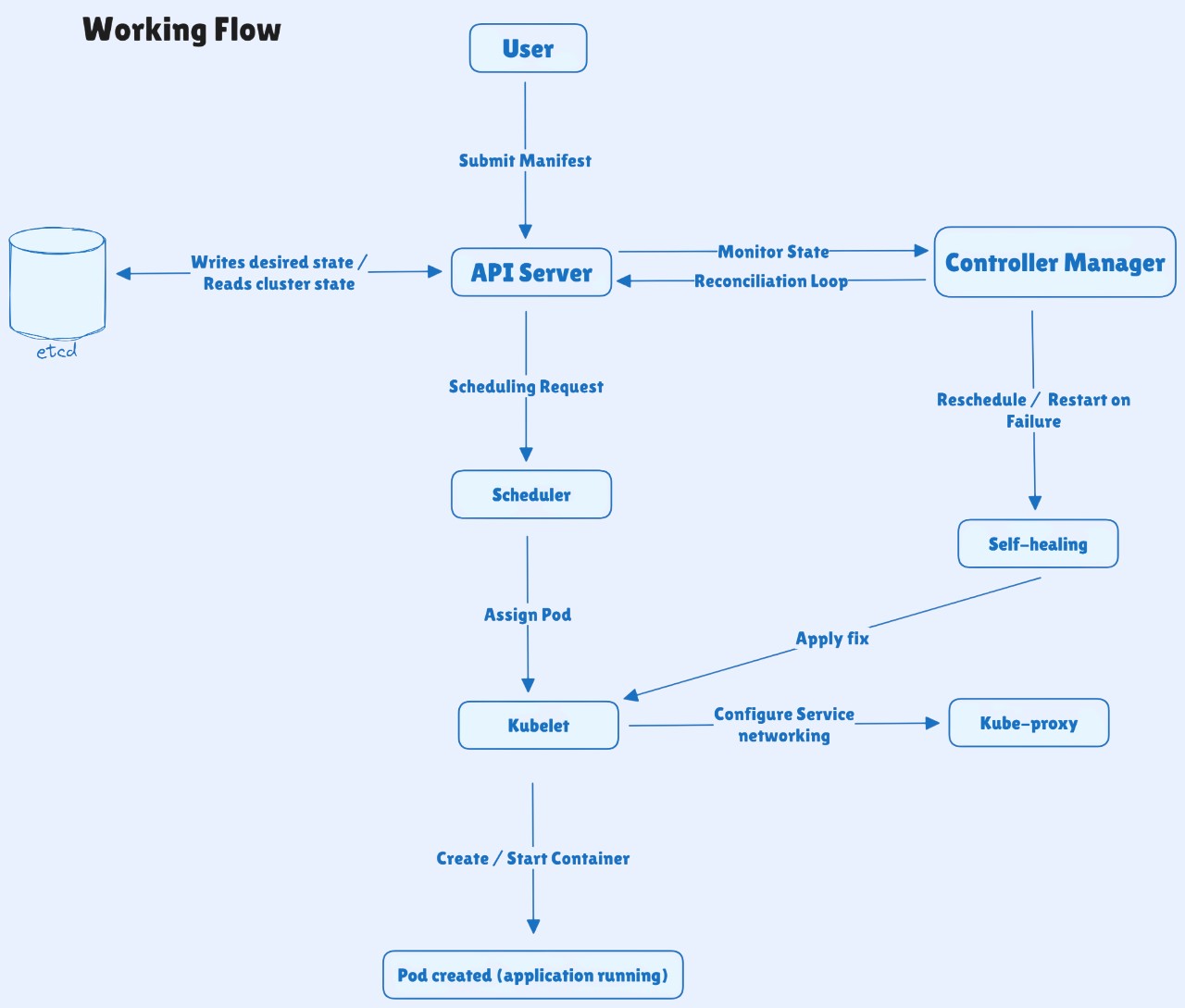
The following steps show how all components interact to deploy and run workloads inside a Kubernetes cluster:
1. You define the desired state using a YAML manifest or a kubectl command (for example, a Deployment or Service).
2. The API Server receives and validates the request, then stores the desired state in etcd.
3. The Controller Manager observes the new resource and ensures the required objects (such as Pods from a Deployment) exist.
4. The Scheduler detects Pods that are not assigned to any node and selects the most suitable worker node based on available resources and scheduling policies.
5. The kubelet on the selected node retrieves the Pod specification from the API Server and prepares the node to run the containers.
6. The container runtime pulls the container image from the registry and starts the containers inside the Pod.
7. The kube-proxy configures networking rules so Pods and Services can communicate across the cluster.
8. If something fails - such as a container crash or node failure - Kubernetes detects the issue and restores the desired state by restarting containers or scheduling new Pods.
Security is an important part of Kubernetes architecture because the API server controls access to the entire cluster. Kubernetes provides several built-in mechanisms to secure communication, authenticate users, and control access to resources.
When designing Kubernetes clusters for production, the following best practices help ensure high availability, reliability, and operational stability:
Kubernetes architecture may seem complex at first because many components work together inside the cluster. However, once we understand the roles of the control plane and worker node components. This understanding helps us to operate, troubleshoot, and design Kubernetes clusters more effectively.