.png)


Ingress is a core part of Kubernetes networking and is widely used in production. However, the Ingress API no longer gets new features. While it is not deprecated and will continue to function, it will not receive new capabilities going forward. This is why the Ingress to Gateway API migration is becoming important.
In this guide, we focus on the practical migration of Ingress to Gateway API using NGINX Gateway Fabric. The goal is to make the transition safe and controlled.
The Ingress API provides a simple and stable way to expose services over HTTP and HTTPS using host-based and path-based routing. It works well for basic north–south traffic and is easy to understand. The API is intentionally small, which makes it predictable and widely supported across Kubernetes distributions. For many years, this simplicity has been one of Ingress’s strengths.
Ingress is also deeply integrated into the Kubernetes ecosystem. Most clusters already have an ingress controller running, and the resource model is familiar to both platform and application teams. Ingress is a reliable and proven solution for simple use cases.
As we mentioned, the Ingress API itself no longer evolves with new capabilities, and advanced routing, traffic management, and protocol support are not part of the specification. Instead, they are implemented through controller-specific annotations. These annotations are not semantically validated by the Kubernetes API, making misconfigurations easy to introduce and difficult to detect.
Ingress also struggles in multi-team environments. It has no native support for per-route RBAC, no clear ownership boundaries, and limited support for safe cross-namespace routing. As clusters grow, shared Ingress resources become difficult to manage and audit, increasing the risk of unintended changes affecting multiple teams.
Gateway API solve these gaps.
Gateway API is a Kubernetes networking API that defines how traffic enters a cluster and how it is routed to services. It is delivered as a set of Custom Resource Definitions (CRDs) and is designed to work alongside existing Kubernetes networking primitives.
Gateway API moves advanced routing behavior into the Kubernetes API itself, where it can be validated, versioned, and safely extended. Instead of relying on controller-specific annotations, it provides a structured and consistent model for managing traffic in modern Kubernetes clusters.
Gateway API introduces a more structured approach to service networking, designed for real-world cluster operations. The capabilities are:
Gateway API is not “Ingress v2”. It is a new contract designed for how Kubernetes is used today.
Gateway API introduces a set of resources, each with a clear responsibility. The resources are:
The relationship between the resources:
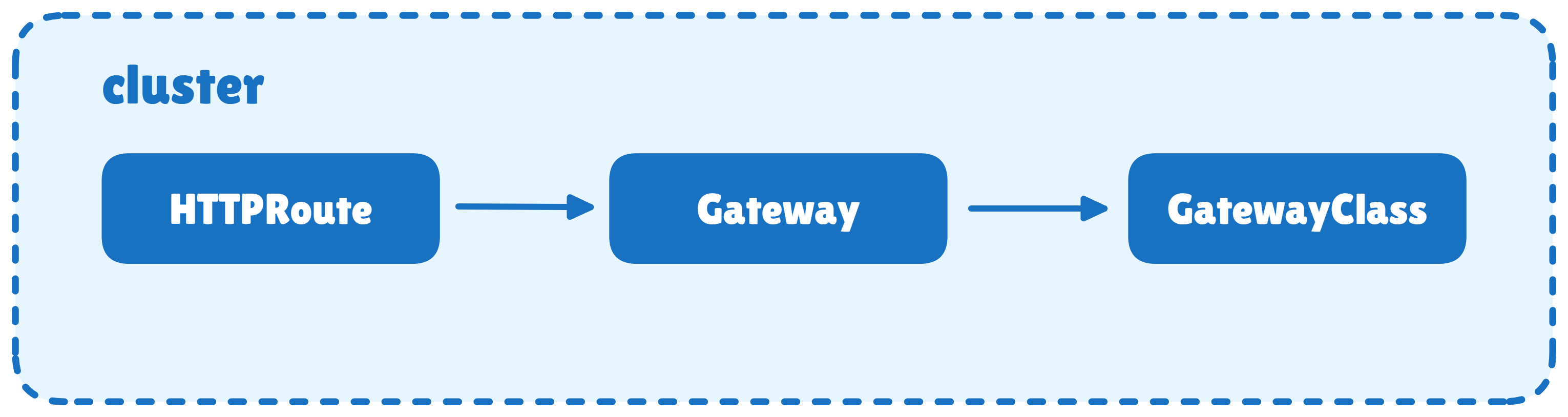
During migration, think of a single Ingress resource being split into three parts:
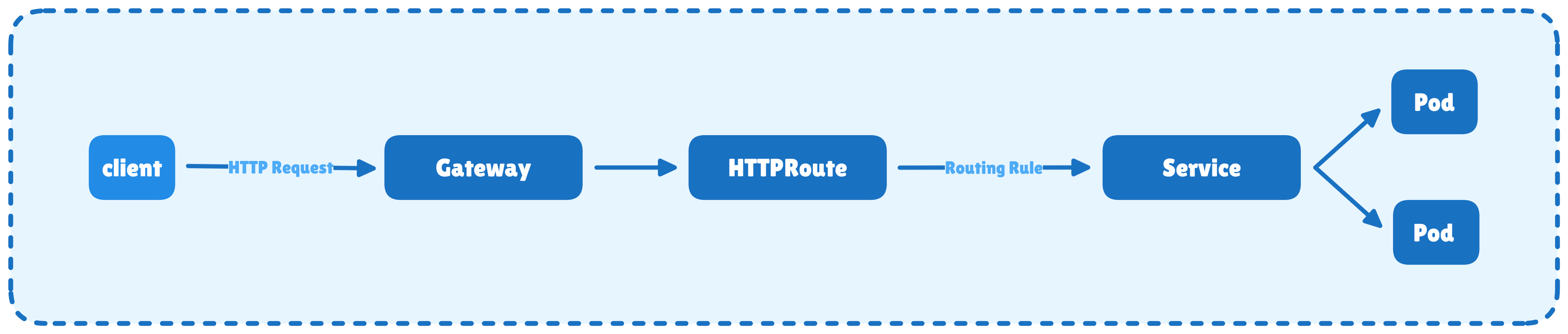
The following points describes a simple and realistic example of HTTP traffic being routed to a Service using a Gateway and an HTTPRoute, where the Gateway is implemented as a reverse proxy.
helm install ingress-nginx ingress-nginx \
  --repo https://kubernetes.github.io/ingress-nginx \
  --namespace ingress-nginx --create-namespace
This installs the Ingress-NGINX controller, creates the ingress-nginx namespace, and exposes an HTTP entry point for incoming traffic.
Verify:
kubectl get pods -n ingress-nginx
kubectl get svc -n ingress-nginx
Output:
NAME                                        READY   STATUS    RESTARTS   AGE
ingress-nginx-controller-6c657c6487-shbhv   1/1     Running   0          18s
NAME                                 TYPE           CLUSTER-IP       EXTERNAL-IP   PORT(S)                      AGE
ingress-nginx-controller             LoadBalancer   10.102.119.241   <pending>     80:31956/TCP,443:31403/TCP   18s
ingress-nginx-controller-admission   ClusterIP      10.101.13.137    <none>        443/TCP                      18s
You must see the controller in the running state, and services are created.
We have to create three backend services (home, orders, payments). Each backend service is defined in its own YAML file containing ConfigMap, Deployment, and Service.
# kubenative-home.yaml
apiVersion: v1
kind: ConfigMap
metadata:
  name: kubenative-home-html
data:
  index.html: |
    <html>
      <head><title>Kubenative Home</title></head>
      <body>
        <h1>Kubenative Home</h1>
        <p>It works for HOME</p>
      </body>
    </html>
---
apiVersion: apps/v1
kind: Deployment
metadata:
  name: kubenative-home
spec:
  replicas: 1
  selector:
    matchLabels:
      app: kubenative-home
  template:
    metadata:
      labels:
        app: kubenative-home
    spec:
      containers:
      - name: httpd
        image: httpd:2.4
        ports:
        - containerPort: 80
        volumeMounts:
        - name: html
          mountPath: /usr/local/apache2/htdocs
      volumes:
      - name: html
        configMap:
          name: kubenative-home-html
---
apiVersion: v1
kind: Service
metadata:
  name: kubenative-home
spec:
  selector:
    app: kubenative-home
  ports:
  - port: 80
    targetPort: 80
# kubenative-orders.yaml
apiVersion: v1
kind: ConfigMap
metadata:
name: kubenative-orders-html
data:
index.html: |
<html>
<head><title>Kubenative Orders</title></head>
<body>
<h1>Kubenative Orders</h1>
<p>It works for ORDERS</p>
</body>
</html>
---
apiVersion: apps/v1
kind: Deployment
metadata:
name: kubenative-orders
spec:
replicas: 1
selector:
matchLabels:
app: kubenative-orders
template:
metadata:
labels:
app: kubenative-orders
spec:
containers:
- name: httpd
image: httpd:2.4
ports:
- containerPort: 80
volumeMounts:
- name: html
mountPath: /usr/local/apache2/htdocs
volumes:
- name: html
configMap:
name: kubenative-orders-html
---
apiVersion: v1
kind: Service
metadata:
name: kubenative-orders
spec:
selector:
app: kubenative-orders
ports:
- port: 80
targetPort: 80# kubenative-payments.yaml
apiVersion: v1
kind: ConfigMap
metadata:
name: kubenative-payments-html
data:
index.html: |
<html>
<head><title>Kubenative Payments</title></head>
<body>
<h1>Kubenative Payments</h1>
<p>It works for PAYMENTS</p>
</body>
</html>
---
apiVersion: apps/v1
kind: Deployment
metadata:
name: kubenative-payments
spec:
replicas: 1
selector:
matchLabels:
app: kubenative-payments
template:
metadata:
labels:
app: kubenative-payments
spec:
containers:
- name: httpd
image: httpd:2.4
ports:
- containerPort: 80
volumeMounts:
- name: html
mountPath: /usr/local/apache2/htdocs
volumes:
- name: html
configMap:
name: kubenative-payments-html
---
apiVersion: v1
kind: Service
metadata:
name: kubenative-payments
spec:
selector:
app: kubenative-payments
ports:
- port: 80
targetPort: 80Apply:
kubectl apply -f kubenative-home.yaml
kubectl apply -f kubenative-orders.yaml
kubectl apply -f kubenative-payments.yaml
Verify Services and Endpoints:
kubectl get svc kubenative-home kubenative-orders kubenative-payments
kubectl get endpointslice
Output:
NAME                  TYPE        CLUSTER-IP       EXTERNAL-IP   PORT(S)   AGE
kubenative-home       ClusterIP   10.101.229.127   <none>        80/TCP    16m
kubenative-orders     ClusterIP   10.96.185.135    <none>        80/TCP    16m
kubenative-payments   ClusterIP   10.109.216.154   <none>        80/TCP    16m
NAME                             ADDRESSTYPE   PORTS   ENDPOINTS      AGE
kubenative-gateway-nginx-n5xgd   IPv4          80      192.168.1.10   11m
kubenative-home-f48vw            IPv4          80      192.168.1.8    16m
kubenative-orders-sm7sz          IPv4          80      192.168.1.7    16m
kubenative-payments-zz7q7        IPv4          80      192.168.1.9    16m
kubernetes                       IPv4          6443    172.30.1.2     34d
If endpoints do not exist, Ingress and Gateway API will both fail.
# kubenative-demo-ingress.yaml
apiVersion: networking.k8s.io/v1
kind: Ingress
metadata:
  name: kubenative-demo-ingress
  namespace: default

  # NGINX-specific annotation
  # This rewrites /orders → / and /payments → /
  # Required because backend apps serve content at /
  annotations:
    nginx.ingress.kubernetes.io/rewrite-target: /

spec:
  # Tells Kubernetes which ingress controller should handle this
  ingressClassName: nginx

  rules:
  - http:
      paths:
      # Root traffic goes to home service
      - path: /
        pathType: Prefix
        backend:
          service:
            name: kubenative-home
            port:
              number: 80

      # /orders traffic goes to orders service
      - path: /orders
        pathType: Prefix
        backend:
          service:
            name: kubenative-orders
            port:
              number: 80

      # /payments traffic goes to payments service
      - path: /payments
        pathType: Prefix
        backend:
          service:
            name: kubenative-payments
            port:
              number: 80
Apply:
kubectl apply -f kubenative-demo-ingress.yamlAt this stage, Ingress acts as the single entry point and handles both traffic entry and routing logic.
Find the Ingress NodePort:
kubectl get svc -n ingress-nginxOutput:
NAME                                 TYPE           CLUSTER-IP       EXTERNAL-IP   PORT(S)                      AGE
ingress-nginx-controller             LoadBalancer   10.102.119.241   <pending>     80:31956/TCP,443:31403/TCP   3m7s
ingress-nginx-controller-admission   ClusterIP      10.101.13.137    <none>        443/TCP                      3m7s
Test(replace 31956 with your NodePort):
curl http://localhost:31956/
curl http://localhost:31956/orders
curl http://localhost:31956/payments
Output:
<html>
  <head><title>Kubenative Home</title></head>
  <body>
    <h1>Kubenative Home</h1>
    <p>It works for HOME</p>
  </body>
</html>
<html>
  <head><title>Kubenative Orders</title></head>
  <body>
    <h1>Kubenative Orders</h1>
    <p>It works for ORDERS</p>
  </body>
</html>
<html>
  <head><title>Kubenative Payments</title></head>
  <body>
    <h1>Kubenative Payments</h1>
    <p>It works for PAYMENTS</p>
  </body>
</html>
Or, we can also check the same output in the web UI, as shown below.
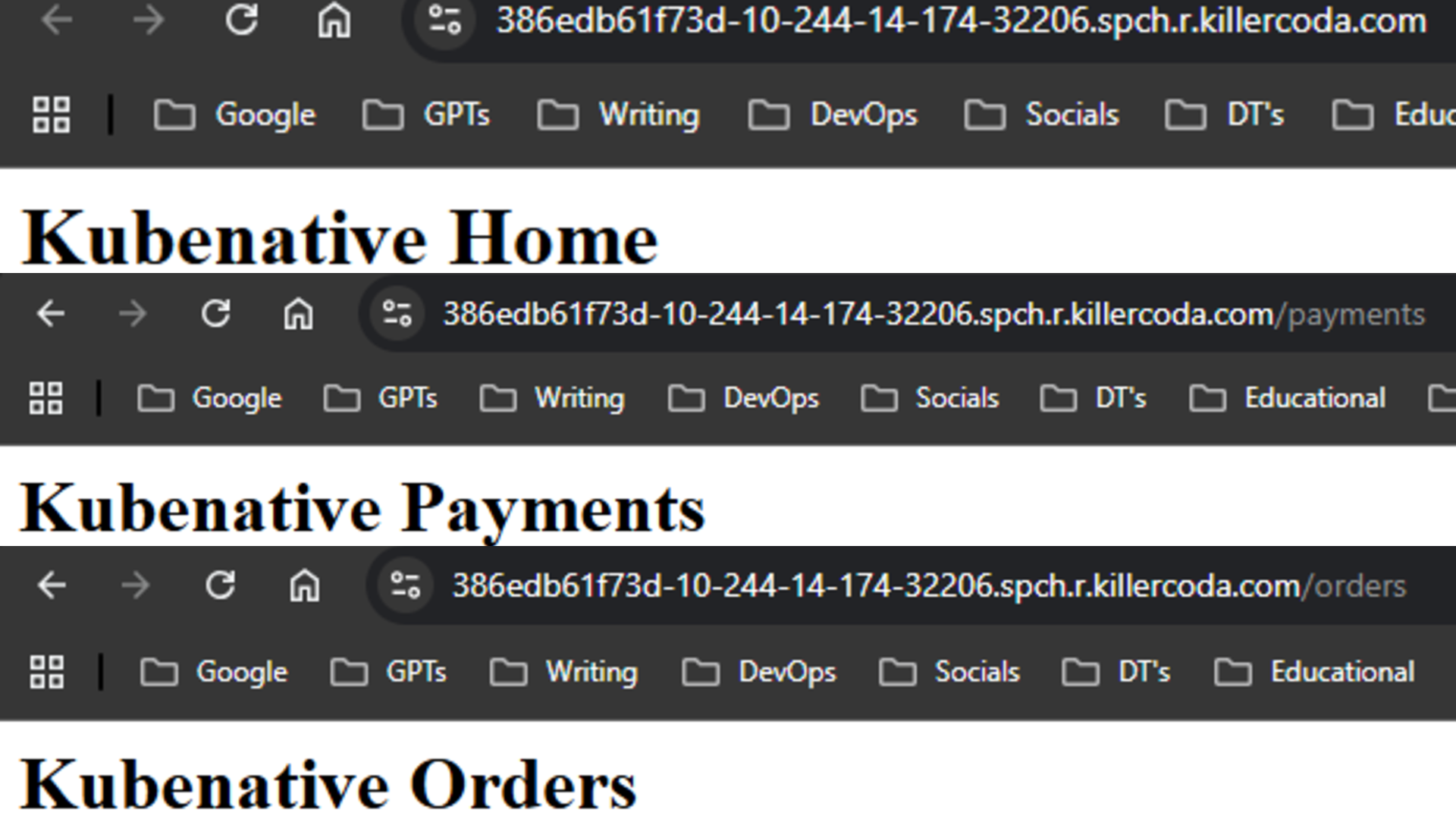
That means ingress is working.
Note: To open the web UI in KillerCoda, click the menu icon (three horizontal lines) on the left sidebar, then go to Traffic/Ports, enter the NodePort under Custom Port, and click Access.
kubectl apply --server-side -f https://github.com/kubernetes-sigs/gateway-api/releases/download/v1.4.1/standard-install.yamlVerify:
kubectl get crd | grep gateway.networking.k8s.ioOutput:
backendtlspolicies.gateway.networking.k8s.io          2026-01-21T22:21:54Z
gatewayclasses.gateway.networking.k8s.io              2026-01-21T22:21:54Z
gateways.gateway.networking.k8s.io                    2026-01-21T22:21:54Z
grpcroutes.gateway.networking.k8s.io                  2026-01-21T22:21:54Z
httproutes.gateway.networking.k8s.io                  2026-01-21T22:21:54Z
referencegrants.gateway.networking.k8s.io             2026-01-21T22:21:55Z
Gateway API does not work without these CRDs.
helm install ngf \
  oci://ghcr.io/nginx/charts/nginx-gateway-fabric \
  -n nginx-gateway --create-namespace
This installs the Gateway API controller, uses NGINX to handle the actual traffic and register GatewayClass: nginx.
Verify:
kubectl get pods -n nginx-gateway
kubectl get gatewayclass
Output:
NAME                                       READY   STATUS    RESTARTS   AGE
ngf-nginx-gateway-fabric-5bff9d865-p254s   1/1     Running   0          16m
NAME    CONTROLLER                                   ACCEPTED   AGE
nginx   gateway.nginx.org/nginx-gateway-controller   True       16m
A pod is running, and “ ACCEPTED: True” means the Gateway API controller has accepted that GatewayClass.
# migration.yaml
apiVersion: gateway.networking.k8s.io/v1
kind: Gateway
metadata:
  name: kubenative-gateway
  namespace: default

spec:
  # Links this Gateway to the NGINX Gateway Fabric controller
  gatewayClassName: nginx

  listeners:
  - name: http
    port: 80
    protocol: HTTP
    # This defines where traffic enters the cluster
---
apiVersion: gateway.networking.k8s.io/v1
kind: HTTPRoute
metadata:
  name: kubenative-routes
  namespace: default
spec:
  parentRefs:
  - name: kubenative-gateway

  rules:
  # Root traffic → home service
  - matches:
    - path:
        type: PathPrefix
        value: /
    backendRefs:
    - name: kubenative-home
      port: 80

  # /orders traffic → orders service (rewrite full path to /)
  - matches:
    - path:
        type: PathPrefix
        value: /orders
    filters:
    - type: URLRewrite
      urlRewrite:
        path:
          type: ReplaceFullPath
          replaceFullPath: /
    backendRefs:
    - name: kubenative-orders
      port: 80

  # /payments traffic → payments service (rewrite full path to /)
  - matches:
    - path:
        type: PathPrefix
        value: /payments
    filters:
    - type: URLRewrite
      urlRewrite:
        path:
          type: ReplaceFullPath
          replaceFullPath: /
    backendRefs:
    - name: kubenative-payments
      port: 80
Apply:
kubectl apply -f migration.yamlUnlike Ingress, the Gateway only defines where traffic enters the cluster. Routing decisions are handled separately using HTTPRoute.
Verify and find the NodePort:
kubectl get svc -n default kubenative-gateway-nginx Output:
NAME                       TYPE           CLUSTER-IP       EXTERNAL-IP   PORT(S)        AGE
kubenative-gateway-nginx   LoadBalancer   10.101.243.136   <pending>     80:30821/TCP   17m
Test(replace 30821 with your NodePort):
curl http://localhost:30821/
curl http://localhost:30821/orders
curl http://localhost:30821/payments
If all of these are returning content as above, that means the Gateway API is handling the traffic.
kubectl delete ingress kubenative-demo-ingress
helm uninstall ingress-nginx -n ingress-nginx
Ingress is removed, and Gateway API is now the single entry point.
Yay, we have successfully migrated from Ingress to Gateway API. This migration is basic, and in production we need to consider the following points.
This guide showed how to move an existing Ingress setup to Gateway API in a safe and practical way. It demonstrates how Gateway API can replace Ingress without breaking traffic.
Once the entry point is on Gateway API, you can gradually add more advanced routing and traffic control features. This makes Gateway API a strong and future-ready choice for Kubernetes networking.